
SMS Recall Reminders
Practice Managers and Administrators can send SMS recalls from the Message Centre.
Before you begin
Permissions:
- View Recalls
- Update Recalls
To send a recall reminder SMS:
- You must be logged into the centre.
- SMS recall messaging must be enabled in Recall Management settings.
- The patient record must include a mobile phone number.
- The patient's consent to receive SMS messages must be recorded.
Procedure
To send a recall reminder SMS to a patient:
-
In the
toolbar, select
 Message Centre > Recalls.
-
In the Recalls panel, filter the list of recalls as
required.

-
Select
 the patients to whom you want to send an SMS recall reminder.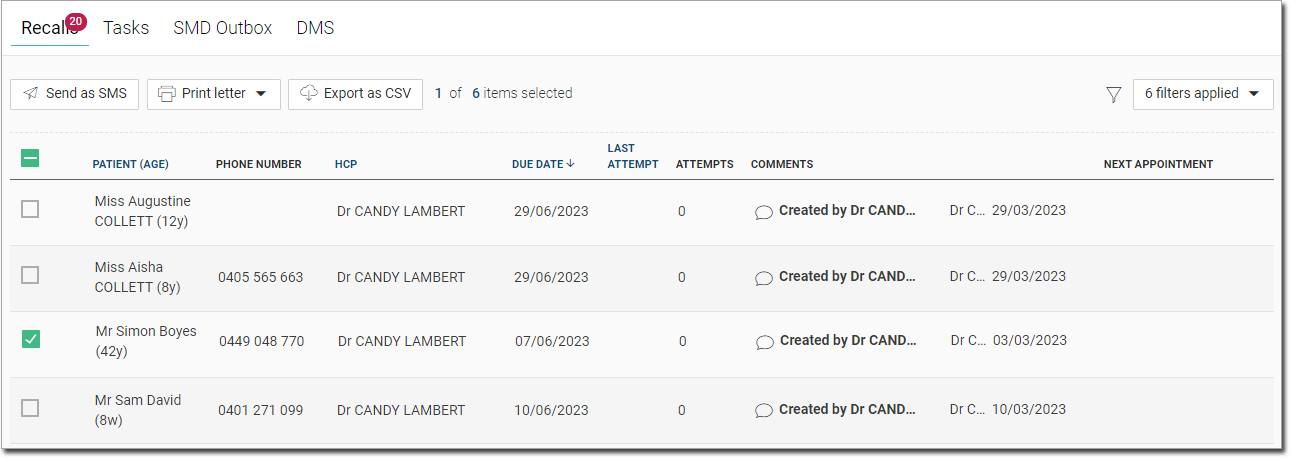
Tip:If a patient has not given their consent to receive SMS messages, a warning message is displayed. -
Click
 Send as SMS.
Results
A note about the recall SMS is added to the patient's timeline.
If you have attempted to send an SMS recall, SMS sent is recorded in the
Comments column and the number of contact attempts is
incremented, regardless of the success or failure of an SMS message delivery.