
Patient Preferences
Record consent and preferences for each patient.
To display Patient Preferences, in Patient
Details, click  Settings next to the Patient ID.
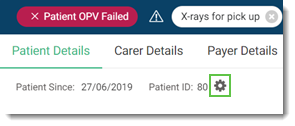
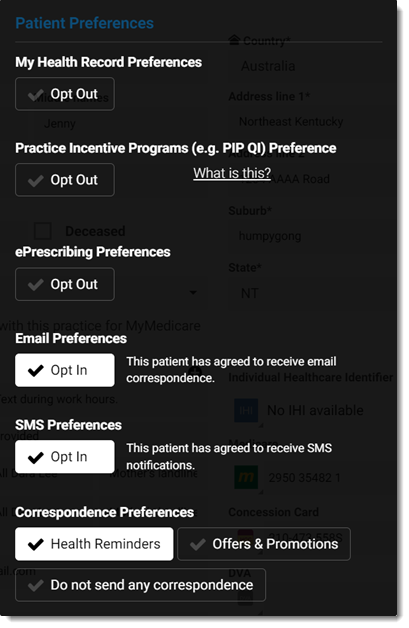
Settings next to the Patient ID.| Preferences | Description |
|---|---|
| My Health Record Preferences | Indicates whether the patient consents to uploading of clinical
documents to My Health Record.
The default is Opt In. If a patient opts out, you cannot upload a Shared Health Summary to My Health Record. For more information, see My Health Record. |
| Practice Incentive Programs (e.g. PIP QI) Preference | Indicates whether the patient wants to Opt Out of the Practice Incentive Program (PIP). For more information, see Practice Incentive Program. |
| ePrescribing Preferences | Indicates whether the patient consents to uploading of
prescriptions through a Prescription Exchange. The default is
Opt In. Note: If a patient opts out, ePrescribing is not
available for the patient. |
| Email Preferences | Indicates whether the patient has agreed to receive emails. Note:
The ePrescription workflow is not
affected by this preference. ePrescription tokens may be emailed
to a pharmacy for a patient or to the patient themselves even if
they have chosen not to receive email. |
| SMS Preferences | Indicates whether the patient consents to receiving SMS reminders
about upcoming
appointments and their MyMedicare registration. For more
information, see Appointment Reminders
and Prompt MyMedicare Registration. Note: The ePrescription workflow is not
affected by this preference. ePrescription tokens may sent using
SMS to the patient, even if they have chosen not to receive SMS
messages. |
| Correspondence Preferences | Indicates whether the patient consents to being contacted regarding Health Reminders or offers and promotions. The default is Opt In. |