
Search for Patient Records
Search for existing patient records using a patient's biographic details, such as their given name, phone number, Medicare number or date of birth.
About this task
Procedure
To search for an existing patient record:
-
From the main menu, select
 Patient Search.
-
In the
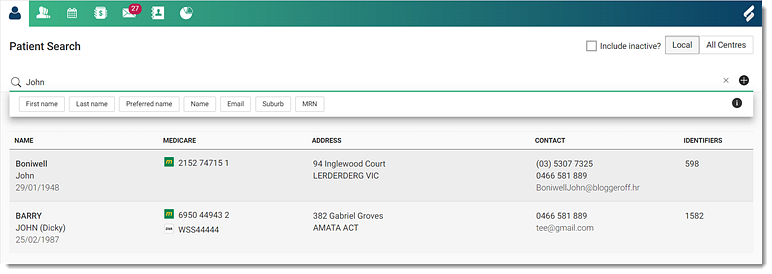
 Search for patient field, enter a patient's given name,
family name, phone number, Medicare number, date of birth or email address.
Patients who meet the search criteria are listed.
Note:
Search for patient field, enter a patient's given name,
family name, phone number, Medicare number, date of birth or email address.
Patients who meet the search criteria are listed.
Note:- If there is no record for this patient, click
 Add new patient and create a new patient record. For more
information, see Create New Patient Records.
Add new patient and create a new patient record. For more
information, see Create New Patient Records. - To find a patient record with exact or close matches, use advanced patient search options. For more information, see Advanced Patient Search.
- If there is no record for this patient, click
-
From the available patient list, select the required patient record item.
Results
If you are a clinical user, you are redirected to the  Patient Timeline panel.
If you are an administrative user, you are redirected to the Visit panel.