
Generate Clinical Notes from the Transcript
About this task
Procedure
-
Select Generate.
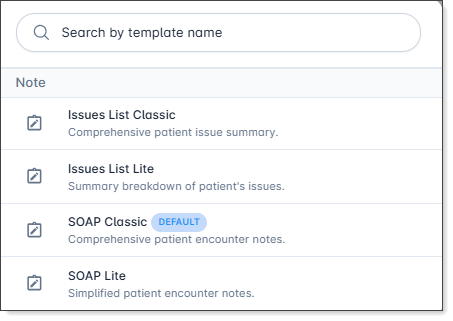
Tip:The Note templates menu is displayed.If a default note template has been configured, it is displayed with the Default label.
-
Select the note template you want to use.
- SOAP Lite: A concise, streamlined version of the SOAP note. It captures the essential clinical findings using short, punchy sentences, making it ideal for rapid review, quick charting, and straightforward follow-up visits
- SOAP Classic: A thorough, traditional medical documentation format. It provides comprehensive narratives and detailed clinical reasoning under each section (subjective, objective, assessment, and plan), perfect for complex consultations and complete records
- Issues List Lite: A brief, problem-focused summary using short sentences. It lists the patient's primary issues or complaints alongside concise, high-level management points for fast reading.
- Issues List Classic: An indepth, comprehensive problem-oriented breakdown. It details each individual issue or diagnosis with thorough history, current status, diagnostic results, and specific treatment plans, making it great for multi-morbid patients.
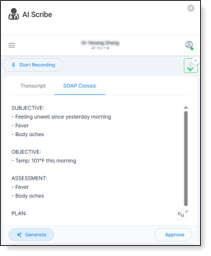
AI Scribe generates a structured clinical note based on the consultation transcript.
What to do next
- Generate - generate another note using a different template
- Approve -save the generated note to the patient's record, see Push notes to Helix
- Provide feedback - provide feedback on the quality of the generated notes
- Close - close the AI Scribe panel and stop the transcription session.