
Create a Visit
A visit is automatically created when an appointment is added for a patient. For walk-in patients, create a visit manually.
Before you begin
About this task
Procedure
-
From the
 Patient Search, enter and select a patient.
-
In the floating navigation bar, click
 Visit.
-
In the Create Visit panel, set:
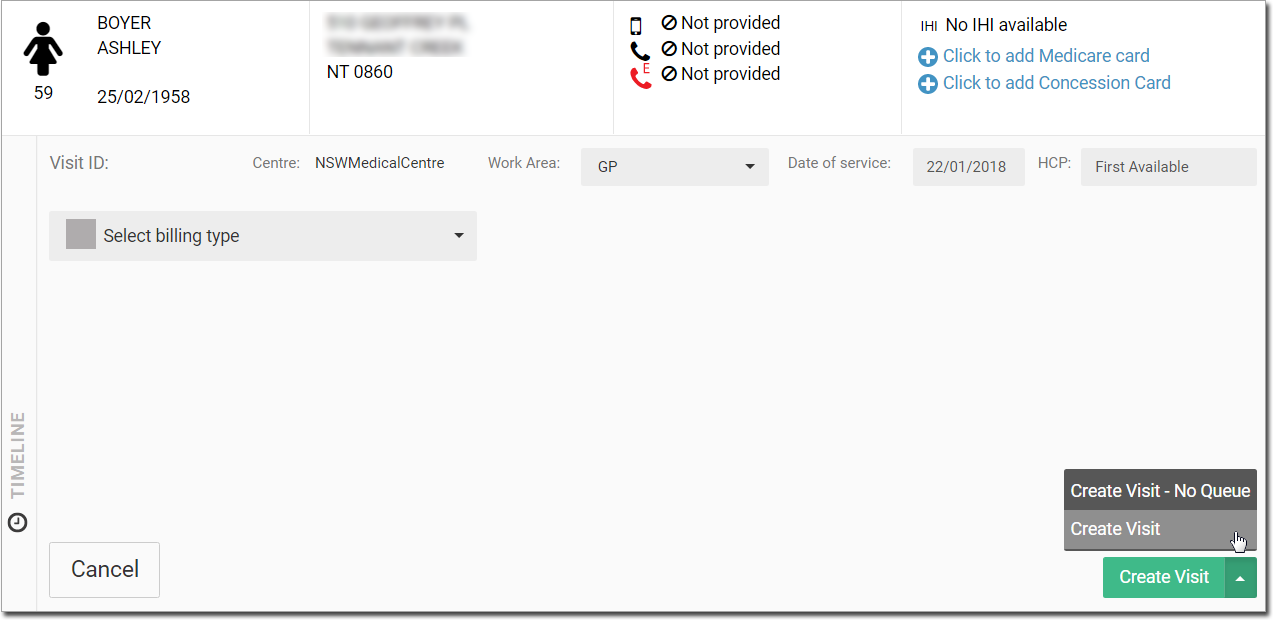
- Centre - defaults to the centre you're currently logged in to.
- Work Area - by default GP. If required, change the required work area from the Work area list. For example, Specialist.
- Date of Service - the current date. If the service was provided on a different day, select a previous date.
- HCP - either the name of the clinician selected when the patient's appointment was made, or First Available. In the latter case, specify a clinician by entering their name in the field.
- Billing type - one of:
- Medicare
- DVA
- Private
- Pre Employment
- Workers Compensation
Tip:DVA and Medicare options are only enabled if these card details have been entered for the patient.  Caution - notifies the administration
staff and practitioners about COVID-19 precautions.
Caution - notifies the administration
staff and practitioners about COVID-19 precautions.
Results
If you selected Create visit, a new visit is recorded with a new Visit ID and the patient is added to the Patient Queue.
If you selected Create visit - No queue, a new
Visit ID is created for the patient in the Visit panel.
You would use this method if you are billing the patient for services delivered that
day (the most common method for recording a visit). A visit voucher is printed and
given to the practitioner when it is the patient’s turn. After the visit has been
recorded, a list of the visit Service Items is added to the patient's timeline,
flagged with the  Visit items. For more information about Patient
Timeline, see Patient Timeline.
Visit items. For more information about Patient
Timeline, see Patient Timeline.
What to do next
- To start a consult for the patient, click Start consult. For more information, see Consultations.
- To initiate a billing process, select a patient and click Visit in the floating navigation bar. For more
information, see Initiate Billing.