
SMS Sender Name
When you send an SMS message to a patient, you can indicate that it came from your practice using your own sender name to help your patients easily identify messages sent from your practice.
Before you begin
Sender names (formerly Alpha Tags) identify your practice's sender name. Recipients of SMS messages sent from your practice will see your sender name instead of your practice's phone number. By default SMS messages from Helix appear to come from MedReminder, unless you specify an alternative. You are required to update your SMS sender name before 1 July 2026.
Note:
Before you update your
SMS sender name in Helix to something
other than MedReminder, first update your Sender ID in SMSGlobal.
If the names used in Helix and
SMSGlobal do not match, ad hoc messages are rejected and are not sent.
About this task
Each Alpha Tag must be unique, and use 3-11 characters. Manage Alpha Tags in Centre Settings.
Procedure
To manage your Alpha Tags:
-
Select
 user >
  Settings.
- Select .
- From the Centre list, select the centre you want to configure the sender name for.
-
Click Settings (located at the right) to open the
Patient Messaging Settings panel.
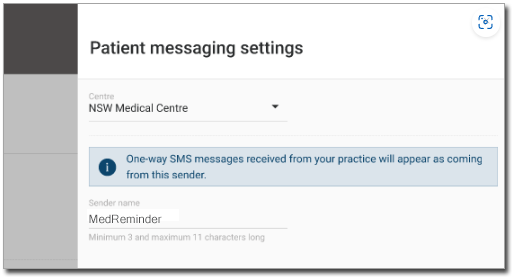
- If required, select a different centre.
- In the Sender name field, enter your preferred sender name, using 3-11 characters.
- Click Save.