
Medicare Receipting
When a payment has been received from Services Australia, receipting can be performed.
About this task
Procedure
To perform the Medicare Receipting:
-
Select
 Claiming, Banking, and Payments > Receipt from the menu.
-
In the Receipt window, from the Centre
list, select the centre for which you want to do receipting.
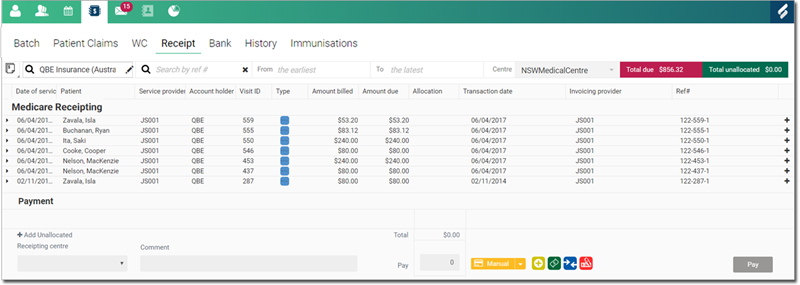
Only the centres to which you belong are listed, unless you have the All Centres permission. -
Select Medicare Receipting from the list.
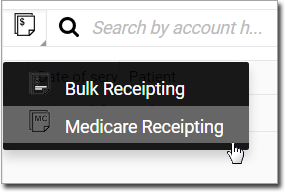
-
In the Search by ref # field, enter the reference number (batch
number) for the batch that was sent to Services Australia. The invoice list is displayed
in the Medicare Receipting section.
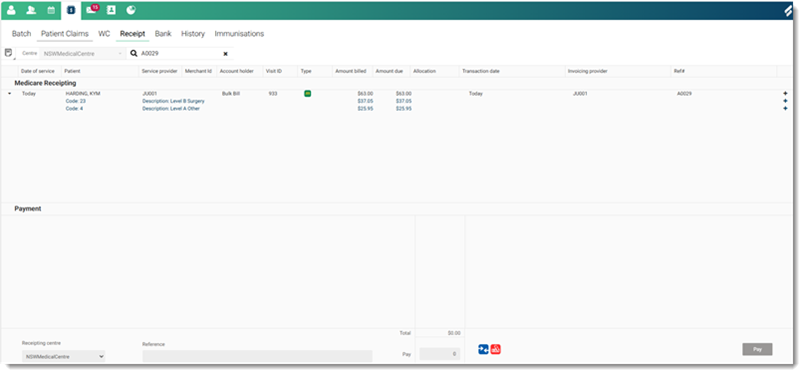
The batch number appears at the start of the batch item on the Batch tab. For more information, refer to Batch and Separate Items from a Batch.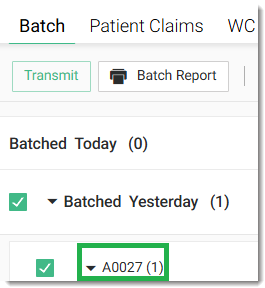
-
To display the associated items, click
 .
.
-
To add items to the Payment section, in the Medicare
Receipting section, click
 Add to payment.
When you hover your mouse over the icon, it shows Add to payment.
Add to payment.
When you hover your mouse over the icon, it shows Add to payment. -
In the Reference field, enter a reference
number for the payment.

Note:This is mandatory and supplied by Services Australia. -
In the Payment section, select the payment type:
 Direct Deposit and
  Cheque are available for Services Australia payments.
- To complete a payment, enter the required bank details.

